
Find a store

Stores

Click on a store to locate.

ALPHA TELECOMMUNICATION SDN BHD

ALPHA TELECOMMUNICATION SDN BHD

G1.25 Imperial Mall Shopping Complex, Jalan Merpati, Miri, 98000 Sarawak

PC IMAGE

PC IMAGE

THE SPRING, SUBLOT 151,LOT 7196, SECTION 64,KTLD, JALAN SIMPANG TIGA,93350 KUCHING, SARAWAK

EMPRESS STUDIO

EMPRESS STUDIO

1-B, INDIA STREET,93000 KUCHING,SARAWAK

COPAL DIGITAL COLOUR PHOTO SDN BHD

COPAL DIGITAL COLOUR PHOTO SDN BHD

LOT 436-437, GROUND FLOOR,JALAN KULAS,93400 KUCHING,SARAWAK

APOLLO DIGITAL COLOUR LAB

APOLLO DIGITAL COLOUR LAB

NO 7, COURT HOUSE ROAD,93000 KUCHING,SARAWAK

Authorized online retailers
Back to top

How to Use the INSTAX Connect Feature

To send

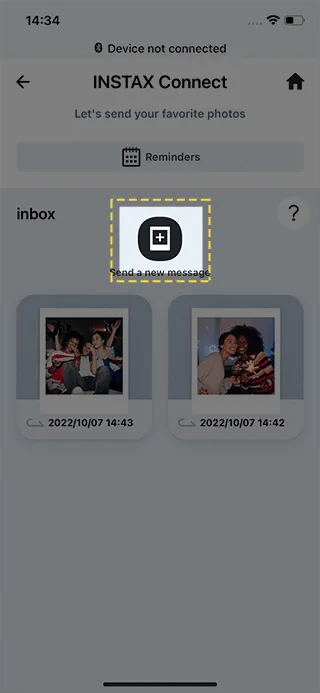
STEP 1

Tap “Send a new message”

STEP 2

Select a Smartphone image.

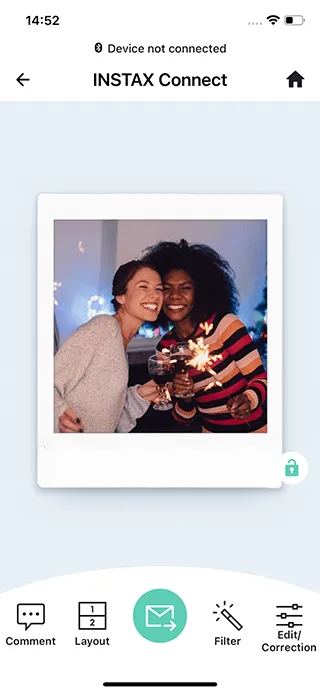
STEP 3

Add a message and adjust the position of the text box.

STEP 4

Share your print via text, Messenger App or email!

To receive

STEP 1

Let’s check the print from the URL you have received.

STEP 2

Reply to comments on your prints. Save the photo with your messages and print it out!